 |
|
Frequently Asked Questions
|
|
Payment Information Please note that your payment terms start from the date that the goods are receipted into our Warehouse, not from when the goods are sent. As a Self-Billing Supplier, it is your responsibility to reconcile your payments. Your documents are available each Monday and will show all items received the previous week between Monday-Friday. It is important you are accessing the self-billing portal in the week following delivery to view your latest statement, to ensure that everything is correct and as expected. Any discrepancies should be raised with the AP team as soon as possible and no later than 28 days after goods receipt. As a Self-Billing Supplier your valid tax invoice is raised within the portal. Please do not send us any invoices/statements or quote them as part of your queries. These are not recognised by our finance team and will be deleted upon receipt. On activation of your self-billing account, please ensure you contact your revenue and customs office and notify them that you are now receiving your VAT documents electronically. To navigate the self-billing portal, please refer to the user guide. (Please note this is in the process of being updated). What should I do if I see a Price discrepancy on my tax invoice? ·
If the price on your
tax invoice does not match your contract, you should directly contact your
Category Team (Buyer)in the first instance. What should I do if I have a query regarding the quantity I have been paid for on my tax invoice? ·
Please click on the ‘Quantity Query’ email link for quantity discrepancy and attach POD (proof of delivery) from our Warehouse. What do I do if I have been debited for a customer return, but not physically received this item back? · Please click on the link below and we will investigate this
with the Warehouse. What should I do if we have POD (proof of delivery) saying the stock has been delivered, but we cannot see this on a tax invoice? · Please click on the ‘Quantity Query’ email link for quantity
discrepancy and attach POD (proof of delivery) from our Warehouse. What should I do if I see “ARADJ” reference on my statement next to the invoice, and I have been paid less that the invoice value? · This will be an adjustment that our AR (accounts
receivable) team has raised. Instead of you paying us for invoices that you owe
to us, we will deduct these from your tax invoice. Please send this query to ar@thevergroup.com What should I do if I think I have invoices due, but have not received a payment? · Please check your statement in the first instance to see if
your account is in a debit balance, you should do this by looking at the
invoices due and not the cumulative total.
Also check for any ARADJ adjustments.
If you still have a query please click on the link
below. What does “Goods ADJ AOC” mean on a tax invoice? · These are adjustments that are raised by our Warehouse and
means that we have either debited or credited your account for
overages/shortages on deliveries. · If you do not agree with the adjustment, please click on
the link below and provide quantity of goods delivered and POD (proof of
delivery). What should I do if I receive a debit on my account that I do not agree with? · These are adjustments that are raised by our AP team on the
instruction of the Warehouse and means that we will either debit or credit your
account for overages/shortages on deliveries. · If you do not agree with the adjustment, please click on the
link below and provide quantity of goods delivered and POD (proof of delivery). What should I do if I can’t remember my user name/password? ·
If you do require
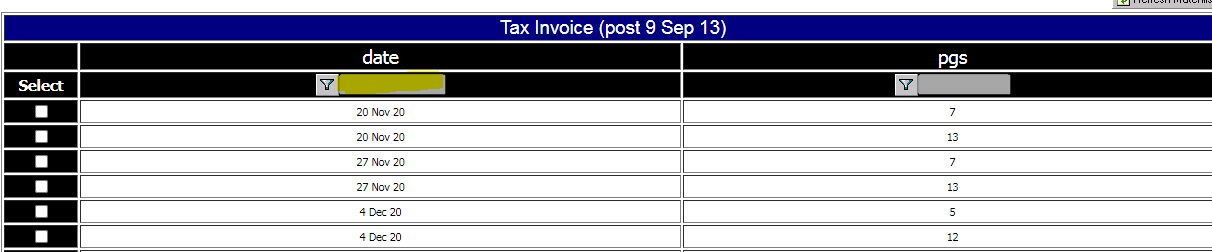
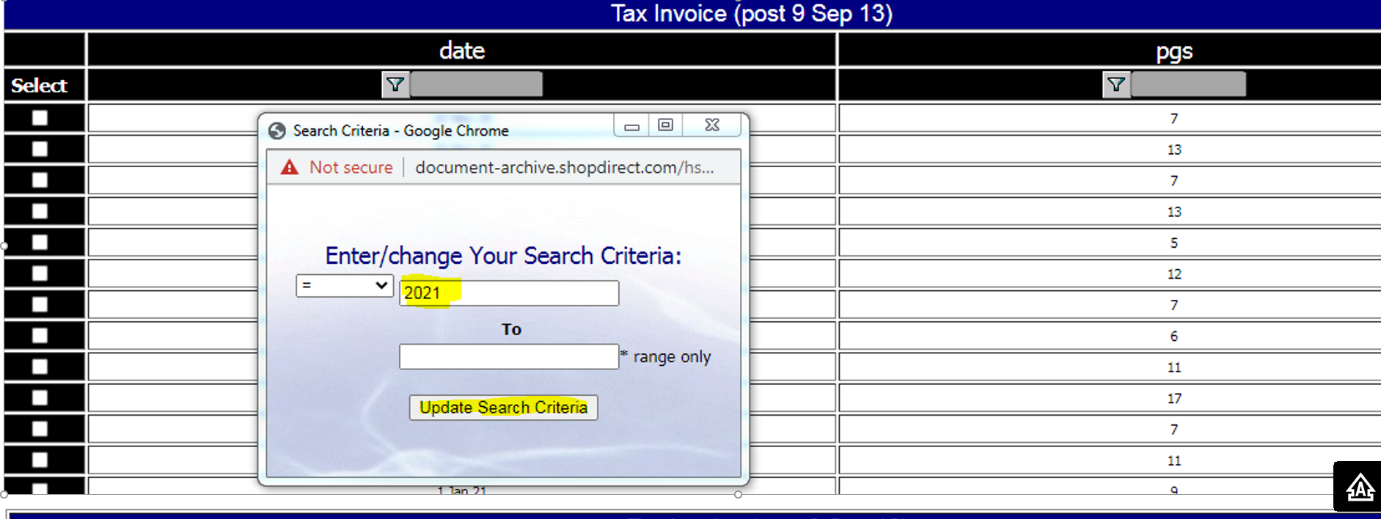
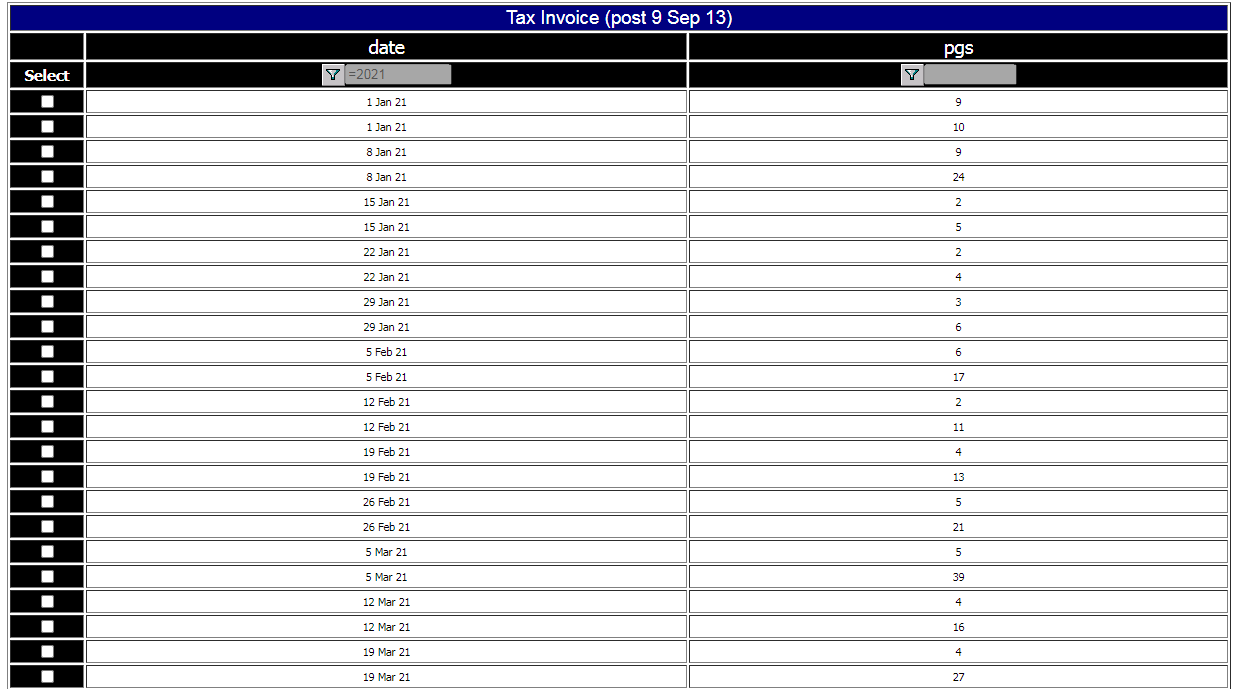
assistance with this, please click on the link below. What should I do if I can’t see the current dates within the portal? ·
Please find steps
below to change your search criteria. |
 |
 |
 |
 |
|
For any other query, please click on
the link below and we will endeavour to answer your question. |